
Most courier jobs need one collection and one delivery at a single time. But multi-drop rounds, medical runs, and day-long pickup schedules are different — each stop needs its own date and time.
That’s exactly what the Light 3 booking theme does. Instead of one global “collection date and time” for the entire journey, every address in the job gets its own date, time, and scheduling fields.
Here’s how to set it up.
Switching to the Light 3 theme
- Go to TransitQuote Pro → Order Form.
- Find the Form Theme setting.
- Choose Light 3 from the dropdown. (Your other options are Classic, Light Checks, and Light — Light 3 is the per-address layout.)

- Save.
That’s the switch. Your booking form will now render a date/time block inside each address, rather than a single global one.
What each address gets
In the Classic and Light themes, one Collection Date and one Collection Time apply to the whole job. In Light 3, every stop — the collection and each delivery — carries its own:
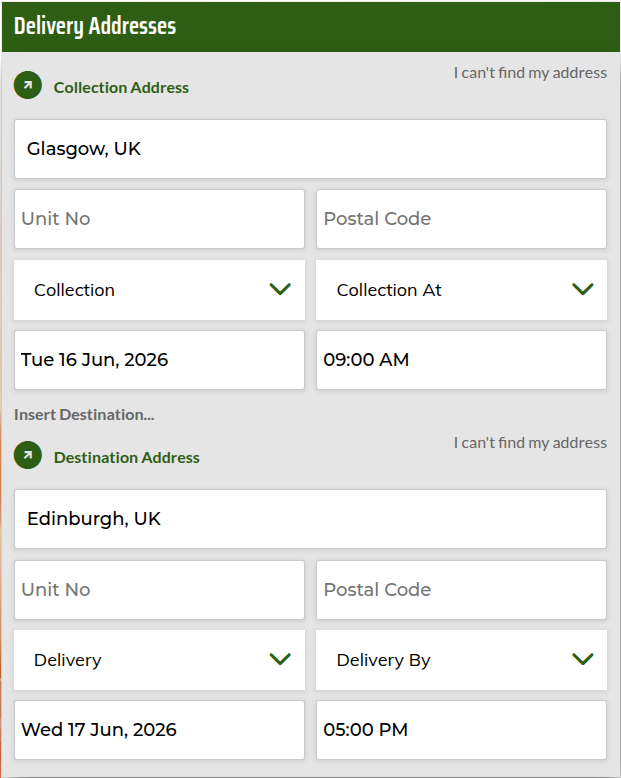
- Date — when this stop happens.
- Time — the time for this stop.
- Visit Type — whether the stop is a Collection, a Delivery, or Collection and Delivery.
- Time Type — choose whether the customer must arrive at a set time, by a deadline, or ASAP.
- Contact name & phone (optional) — switch these on in the Order Form settings and each stop captures its own contact, so the driver knows exactly who to call at every address.
So a customer can book “collect at 09:00 on Tuesday, deliver by 17:00 on Wednesday” in a single job — exactly as shown above — and the form captures each constraint against the correct stop.
With the contact fields switched on too, a single stop can carry the full set — address, unit, postcode, contact name and phone, visit type, time type, date and time:
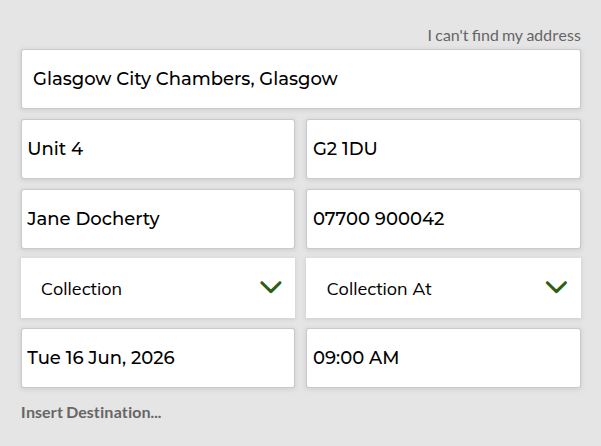
The labels (Collection Date, Collection Time, and Time Type) are all editable from the Order Form tab, so you can word them to match how your business talks to customers.
When to use Light 3
- Scheduled multi-drop rounds — each drop booked for its own slot.
- Medical and lab couriers — timed sample collections with delivery deadlines.
- Pre-booked pickup days — several collections across a day, each at a different time.
- Anything with a deadline per stop — “by 9am” at one address, “at 2pm” at another.
If your jobs are single collection → single delivery with one time, the standard Light or Classic theme is simpler and a better fit. Light 3 earns its keep the moment stops need different times.
Frequently asked questions
| Question | Answer |
|---|---|
| Can I switch back to another theme later? | Yes — the Form Theme setting on the Order Form tab lets you change at any time. Existing jobs keep their data. |
| Does Light 3 work with WooCommerce checkout? | Yes, including block-based checkout. (Make sure you’re on the latest version of TransitQuote Pro for the smoothest experience.) |
Ready to try it?
Make sure you’re on the latest TransitQuote Pro (one click from the Plugins screen), then go to TransitQuote Pro → Order Form and set Form Theme to Light 3. Run a test booking with two stops at different times to see the per-address fields in action.
Questions? Get in touch via our contact form.
Our plugin is updated and all working perfectly now.
Thanks so much for your excellent service!