A run of TransitTrack updates adding a custom CSS box, theme-styling fixes, lazy loading, and PHP 8 reliability improvements.
March–June 2026
New Features
- Custom CSS box — A new Settings tab (now the default landing tab) lets administrators add custom CSS for the tracking display. The CSS loads only on pages containing the
[TransitTrack]shortcode, so it can’t leak elsewhere; scope overrides with the.transit-track-divselector.
Improvements
- Automatic schema upgrades on update — Future database changes now apply automatically when WordPress updates the plugin, instead of only on a manual reactivation.
- Lighter page loads — Service and vehicle data is now loaded only when a job is actually formatted, so ordinary page requests no longer run extra database queries at boot.
Bug Fixes
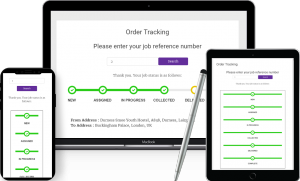
- Fixed the tracking display styling breaking on themes that don’t use an
.entry-contentwrapper (e.g. Hello Elementor) — over-long first progress line, grey bleed behind the first step, and wrong active-step colour. Styling now applies regardless of theme. - Fixed mobile progress-bar alignment so step circles and ticks sit centred on each row.
- Fixed a fatal “cannot access protected property” error that broke the admin settings page on PHP 8.
- Fixed activation not creating the plugin’s database tables, and a fatal error on front-end/WP-CLI page loads caused by an admin-only function being called unconditionally.
- Fixed automatic updates: corrected the update-server domain, switched detection to the shared TransitQuote Pro purchase email (removing the separate redundant email field), and fixed the license page showing the wrong domain or serving an empty update package when no email was set.
Reliability & PHP 8 Compatibility
- Hardened latent PHP 8 warnings in the job-details table and date formatter: an empty job now renders a clean “No information available.” table instead of an undefined-variable notice and broken markup, and date-only delivery times no longer trigger warnings or a DateTime exception.